

Quickie: Permission granted by rule
Ok this may be something that probably I am the only one that didn’t know but…. Did you know that on Tableau Cloud you can check which rule grants specific rights to a user by clicking on the user? Years of use and I never realised that. Usual view: But once you click a user on the lower part of…
read more
Custom SQL, relationships, string aggregations and an unexpected behaviour
It has been a while since my last blog post. For today I will be sharing a small finding that most likely is very “edge-casey” but for those that run into it, it might be interesting to read. Just this day I encountered an issue where Tableau would constantly show me 13 rows when the involved table only had 11.…
read more
How to (visually) inspect Tableau’s forecast accuracy
Tableau offers some “out of the box” forecasting options. And while these will not be as great as advanced machine learning approaches, they still can offer some guidance on how – for example – your sales might develop. Adding a forecast is simple: as long as you have a decently filled timeline (notice: I will not go into all caveats…
read more
Quicke: 2025.2 Find in data pane
Tableau 2025.2 dropped recently and whilst it has lots of cool new features (dynamic spatial parameters, anyone?) it is also often the small things that can make your life so much easier. Have you noticed Tableau offers “find in data pane”? Just right click a dimension or measure on your view and it will offer “find in data pane”. Once…
read more
Relationships and (Data Source) Filters – Follow up blog post with Kirk Munroe
Following up on my >> previous blog post << I had the pleasure to virtually meet with Kirk Munroe and discuss the issues outlined in my posting. For those of you not yet familiar with Kirk, he is the author of “Data Modelling with Tableau.” He is also a frequent guest on renowned Tableau blogs and Youtube channels. These include…
read more
Tableau 2025.1 Relationships, Data Source Filters and an unexpected behavior.
Today at work I ran into an unexpected behavior when using relationships in Tableau 2025.1.1 with the new feature of table specific data source filters. For those of you who might not be aware, this is the new feature I am talking about: Notice how we are now able to select the scope of the applied filters. Either, it supposedly…
read more
Quickie: How to make a parameter “fire” on apply, not on change.
For today just a small tip on how to align your parameter changes and filters to all become effective on clicking the same button, like here: How to do this Parameters in Tableau allow the user to provide single values to their workbook. This feature enables interactivity in dashboards. It also allows for the dynamic change of calculations. As Tableau…
read more
Automatically set a date picker parameter to Sunday
This is a question that recently came up and my solution to this is quite simple. Assume you have an empty date parameter, that is a parameter of “date” type with no limitations like this: This will enable your users to click it and be greeted with a calendar style date picker w/o any further preparations: However, assume for whatever…
read more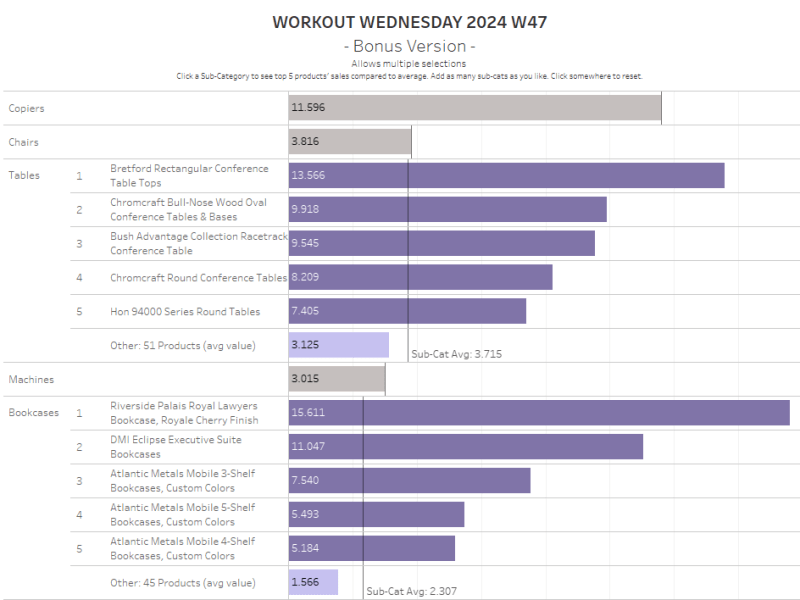
Let’s build – Workout Wednesday 2024 W47 Bonus Version (Multi-Select)
Over my Christmas Holiday’s I finally had a little bit of time to go back to practicing a bit / playing around with Workout Wednesday challenges and since I had’t done so in a long time, there were plenty for me. Week 47 by Erica Hughes asked us to provide a solution to a three level challenge. Requiring the option…
read more
How To select preceding periods with broken time ranges or cross year using sets.
Assume you have been tasked with creating an option for your users to freely select any (monthly) time period. This period shall be compared not to the previous year but to the preceding months. Example: Your user select Jan, Feb and March 2024, then your preceding periods would be Oct, Nov and Dec 2023. The selected time frame can also…
read more
Dude, Where’s My S(C)roll b(ar)?
Anyone remember this move straight from the Millenium? Heavens, time flies. Anyways, I kinda felt like the guys in the movie today. After weeks of work on Tableau Desktop, I uploaded a Dashboard for final release. It was meant to be shared with a wide audience on our Tableau Cloud instance. Some checks here, some checks there, all looking great…
read more
An easy way to limit set selection
For today we shall have a look at an easy way to limit the number of selections like in this example. Create the sets First, start by right clicking Customers and select “create –> set”. Select all customers and name it [SET – All customers]. Next, do the same again but this time don’t select any customer (you could, but…
read more
Filter a table w/o filtering
For this month’s posting we will have a look at how to enable your users to “filter” columns from a text table without actually filtering it. Why would that be needed? Well one idea could be that you have one of these massive tables (you know, the ones you do not want to built but need to create anyways) and…
read more
The Hidden Gems
Today, I will not be sharing a “how to” or anything else I did myself but I thought it might be time to shine (an additional) light on some great people that I consider the “hidden gems”, Here is a list of names and their blogs I believe deserve (even) more recognition for what they provide. You will not find…
read more
Using a SET to Filter “and” condition
Recently on the forums a user asked how they could use a filter that was conditioned to imply “and” instead of “or” (factually I think Tableau translates any multi-select as an “in” clause like “where xyz in (….)” ). So, what did the user want to do? The requirement Let’s have a look to better understand the requirement: Traditionally, when…
read more
Let’s build: Creating a Carousel in Tableau
By popular request: Are you tired of ordinary visualizations? Unveil the magic of building a captivating carousel in Tableau with just one parameter and five calculations. Skip the “why” and plunge into the how, or join me for a deep dive into the process. Harness the power of X and Y calculations, dynamic positioning, and more to create an awe-inspiring,…
read more
Mastering Table Calculations Pt. 3: Practical Application at the Example of WOW2024-W15
In the final part of the series on table calculations, we apply our knowledge to create a dynamic trellis chart for the WOW2024-W15 challenge. Addressing the challenges of data padding and domain completion, we ensure the accuracy of our visual results. Two options – “At the Level” and Domain Completion – are explored to fix display inconsistencies, concluding our practical…
read more
Mastering Table Calculations Pt. 2: Excursus on Domain Padding and Domain Completion
This part of the series on table calculations explores Domain Completion and Domain Padding as methods for dealing with sparse data in Tableau.
read more
Mastering Table Calculations Pt. 1: From Basics to Advanced Settings
Ignited by WOW2024-W15 my new mini-series focuses on table calculations in Tableau. Part 1 delves into the intricacies of table calculations going from bascis to advanced. Data densification is and its relation to table calcs is explored in Part 2. The seriess concludes with a practical application of the learnings at the example of WOW2024-Week 15 challenge in Part 3.…
read more
Quickie: how to handle missing geo data on webedit
Lately, I had shared a quick tip of using a simply calculated field with just a country name in it to createa country field that you can use for example to beautify your map visuals. Another use case is when your dataset does not allow you to edit it and only carries values that are ambiguous. Most often this is…
read more
Quickie: how often do our sales staff need more days than the allowed threshold between sales?
Heavens, time is flying by, isn’t it? Already time for a new blog post. Since I am somewhat short on time these days, I just have a quick one to share. Assume your task is to provide your sales management with an overview that allows them to easily figure out how often it takes a specific sales person longer than…
read more
Fair cohort retention analysis
My today’s posting is not only technical but a reminder to always think about what you provide when being tasked with something. Do not only technically solve something, make sure that it is logically viable. Imagine your superior comes to you and tasks you with the following. “We need to do a cohort retention analysis of our sales staff. Please…
read more
A quickie on maps
For today I have just a super tiny tip. Sometimes, your dataset only consists of data like [city name], the [latitude] and the [longitude]. No further information available. If you put that on a map, Tableau will automatically draw the dots and the map in the background like this: That is ok but not really great. An easy option to…
read more
How to put a ratio above a side by side bar chart built from two different measures
Today we are going to deal with a request that recently popped up during our work. The question was how to put a ratio above two bars from two different measures that are grouped by year. Like this: Either, there is nothing on this topic or we are very bad at googling, but in any case, here is the solution…
read more
Hierarchy filters without data prep
The last one for 2023 is something I had on my mind for quite a while but never really got the time to do it: Creating a hierarchy filter in Tableau. Until recently, there was not much on this issue; at least not that I’d be aware of. The only one I remember to have written a blog on this…
read more
A toggle without using paramaters
Usually, when using toggles, we refer to using parameters. However, it is also possible to create a toggle using a dimension and its two members (two because a toggle is either on or off, true or false, 1 or 0, A or B – or, you would have to “make it two” by whatever logic you apply) without creating an…
read more
A(nother) quickie on bar chart labeling
A quick one for today. How do we get from this to this? There are several techniques and I have described one >> here << already but the one for today is this: and that’s it already. Now you have at least two techniques at hand. I hope you find that useful. As always appreciate your feedback. Until next time…
read more
How to do a count distinct over a rolling window
Recently a user on the forums asked how a distinct count over a rolling window could be done. Easy, you might say at first. Just use countd() and all be good. And that is true – and it is not. The problem we are facing here is that the usual countd() combined with say a quarterly time dimension will translate…
read more
Let’s build – fun with maps
In today’s episode of “Let’s build” we will create a dashboard (or: a sibling thereof) that I presented during our E&V Tableau Days 2023. Given that during that session I only had 35 minutes to do the data source prep and explanations, the calculations (20+) and then the actual dashboarding, I was a bit under time pressure and here and…
read more
Let’s build – A dynamic table allowing your viewers to select the drill down dimensions
Every now and then on the forums people are asking how they can provide their viewers at least to some degree the freedom to select the dimensions they (the viewers) want to make use of. Instead of just having the choice of seeing sales broken down by Category and Order Date, maybe they want to be able to see it…
read moreSomething went wrong. Please refresh the page and/or try again.
 Tableau Adventurer