
For today I got a tip which mostly is layout’ish but also somewhat data privacy related
The question was how we could get a table like this:
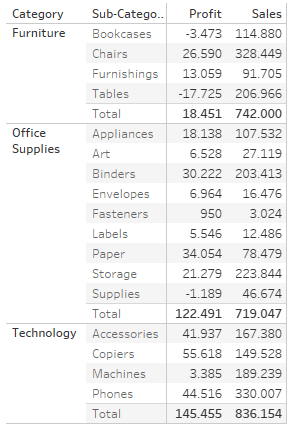
to only show Details for in this example the sales but profits should only be shown in the (Sub) Total line.
Building on Jeff Shaffer’s great blog post on custom subtotals over at dataplusscience.com we can build out the solution pretty easily.
Create a calculated field that we use to replace our [Profit] field:
if SIZE()=1 then sum([Profit]) else null ENDSet it to – in this example – compute using Sub-Category
and this is what you get:

The charming part is that this does not require any “invisibility” via formatting. Also, a user can not “unhide” any formatted values by clicking the table.
And that’s my quick tip for today, I hope you found that useful.
As always appreciate your feedback.
Until next time.
Steffen
 Tableau Adventurer
Thank you so much for this! It was extremely helpful in a dashboard I’m making, but I’m running into one challenge. In using your example above, if there is just one sub-category under a category the value for Profit will display in the sub-category row (vs just the Total row) as the resulting value of SIZE() is 1 for both the sub-category row and the Total row. Do you have any suggestions on how to hide the Profit value in the sub-category row in this instance?
LikeLike