
Assume you have been tasked with creating an option for your users to freely select any (monthly) time period. This period shall be compared not to the previous year but to the preceding months.
Example: Your user select Jan, Feb and March 2024, then your preceding periods would be Oct, Nov and Dec 2023.
The selected time frame can also cross years or, it can even have gaps in it. Though I would not know why that would ever be a sensible request, let’s just pretend it is for now.
So, the selected month’s might just as well comprise say Oct. 23, Nov. 23 and Jan 24 and Feb 24.
Then the comparison periods would be Jun 23, Jul 23, Sept 23 and Oct 23.
Let’s get it done
Start by connecting to sample superstore on your Tableau application.
Next. right click the Order date, select “create”, from there “custom date”.
On the second row in the popup, select “month” and keep “Date value” selected on the last choice.
Now, right click this just created [Order Date (Months)} field, again click “create”, go to “Set”.
Select some Months as you like. I selected Dec 23 to March 24, so four months in total.
Give the set a name. I named it [Order Date (Months) Set – Selected]
Create a calculation that counts how many months have been selected like this:
//cnt of months selected / Offset
{ countd(if [Order Date (Months) Set - Selected] then[Order Date (Months)] end) }
Notice how i use a a fixed calculation, implied by the moustache brackets.
Create a second calculation:
//Preceding period months
IF [Order Date (Months) Set - Selected] THEN dateadd('month', - [cnt of months selected / Offset], [Order Date (Months)]) end
This will give you a dimension with the preceeding months, and a null for all others.
From this, create another set (right click [Preceding periods months] –> create –> set)
This one I named “Preceding Period Months Set”.
Now open the set and do as shown on the screen:

We are basically self-referencing here but the charming part is that we now “moved” the preceding months, which so far only resided next to our monthly dates but on the same row level, see here:
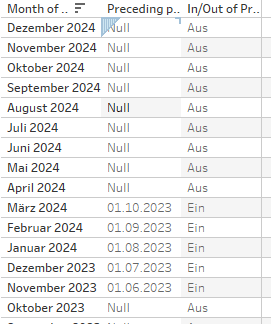
into a set. And a set we can use pretty much independently of the view. So, we stored the preceding months. Now we can use them wherever we please.
Create two KPIs to test
For your main (i.e. the selected) period:
//sales for selected months
if [Order Date (Months) Set - Selected] then [Sales] END
and for the preceding period:
//sales for preciding periods
if [Order Date (Months)] IN [Preceding period months Set] then [Sales] END
We need a slightly different calculation here. We must check for every row in our data. We need to determine if the month of that row is within our preceding set.
We do not need to use this approach for the selected month as the sales will be based on the respective month:

But for the preceding period, we need the values of other rows in our data, not where the month equals the selected month:
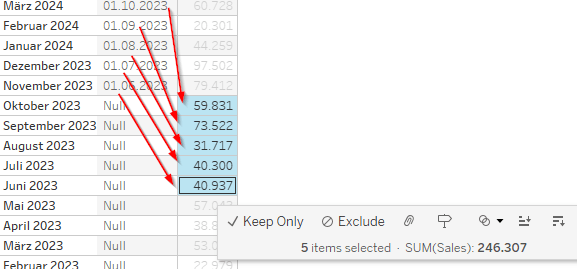
Create a quick BAN by putting the two sales calculations on a new sheet, add them to text and make it fit our wishes.
And with that you are done for today.
Find my workbook on my Tableau Public.
Are there other options?
Filters don’T work here
The first thing we need to acknowledge is that filters will not do the trick as – by definition – they filter out anything not in the filter selection. Thus, if we select our period, the preceding period will not exist in the data and thus, we cannot use it.
Parameters are an option
If we remove the (somewhat strange and artificial) requirement that our time range selection must also allow broken periods, then using simply two parameters with start and end date obviously would be an easy solution.
And that’s it for today, most likely the last post of the year 2024.
Thanks for reading.
As always appreciate your feedback.
Until next time.
Steffen
 Tableau Adventurer
Leave a comment