
Recently on the forums a user asked how they could use a filter that was conditioned to imply “and” instead of “or” (factually I think Tableau translates any multi-select as an “in” clause like “where xyz in (….)” ).
So, what did the user want to do?
The requirement
Let’s have a look to better understand the requirement:

Traditionally, when filtering for a region and selecting “South” only, all three names would remain (but only with South selected).
Now if we select “West” additionally, still all three Customer Names would remain visible.
But the user’s requirement was that South and West must be jointly fulfilled. So only the Aaron’s should remain visible on the above screen because Anemone is only active in South but not in West.
How to achieve this
My way to achieve this is to create a region set. To do so, just right click the region pill on the data pane and click create –> set.

Next, we need two calculations.
The first one will tell us how many regions are selected. The second one will tell us how many of the selected regions can be found within each customer.
//count selected regions
{COUNTD(IF [Region] in [Region Set] THEN [Region] END)}
//count of selected regions per customer
{fixed [customer name]: COUNTD(IF [Region] in [Region Set] THEN [Region] END) }The first formula will give us back the global number of items in our set.
The second formula will do just that but fixed at every customer.
And if both are the same, this means the condition (“and”) is fulfilled. So, we turn this into our third and final calculation:
//FILTER
sum(count selected regions) = sum(count of selected regions per customer)
Put it on filter shelf and set to true.
Right click your region set and tick “show set” (do not use as filter!)
MY full range of customers I selected is nine people.

Notice that contrary to a classic filter, we now get to see everything, if nothing is selected whereas a classic filter would require us to select everything.
If we tick “Central” in our set, the five people that are active in Central should remain:
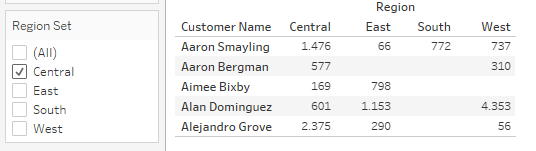
Again, contrary to a classic filter, we still see the entirety of their data.
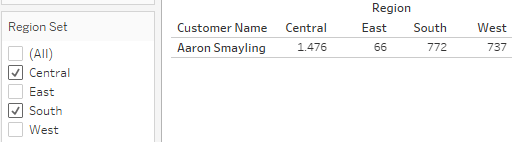
If we select South in addition to Central, only Aaron Smayling will fulfill the resulting “and” requirement (must be active in Central AND in South):
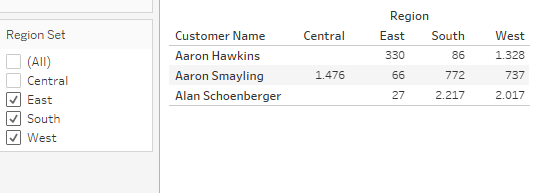
Finally, if our requirement is that somebody needs to be active in East, South and West, only Aaron Hawkins, Aaron Smayling and Alan Schoenberger fufill these joint conditions:
And that shall conclude our test cases.
After my recent rather long posts on Table calculations this one was a rather short.. Find the dashboard on my Tableau Public.
And that’s it for today.
I hope you found that useful.
As always appreciate your feedback.
Until next time.
Steffen
 Tableau Adventurer
Leave a comment