
A quick one for today.
How do we get from this
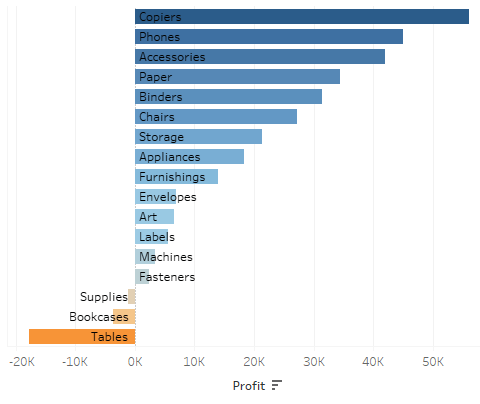
to this?
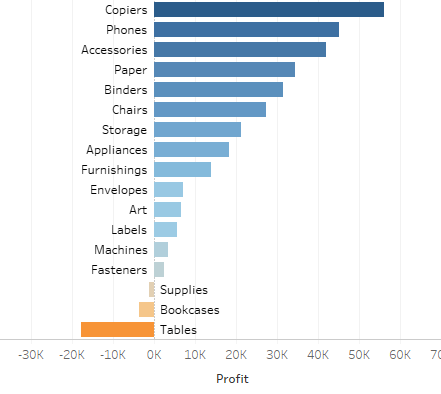
There are several techniques and I have described one >> here << already but the one for today is this:
- add a secondary axis to your columns (sum(0))
- Dual axis, synchronize
- create two calculated fields, one named “label +” the other “label -“
- Label + calculation:
if sum([Profit]) > 0 then attr([Sub-Category]) END - Label – same but inverted condition (<)
- Turn your sum(profit) from bar chart into gantt bar, add sum(profit) onto the size field and invert it (add a minus upfront or multiply by minus 1)
- Add label + on your label field, click the label field and set “left align”.
- For the secondary axis, remove all colors, add label – to label field and alignment to right.
and that’s it already.
Now you have at least two techniques at hand.
I hope you find that useful.
As always appreciate your feedback.
Until next time
Steffen
 Tableau Adventurer
Leave a comment